


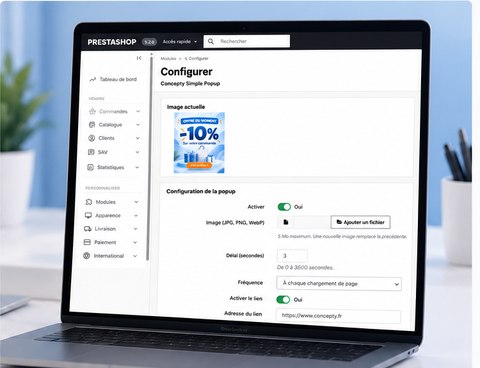
A promotional image should not require a complex marketing suite. Concepty Simple Popup focuses on one popup with the essential settings.
Install the module
In the PrestaShop back office, open Modules > Module Manager > Upload a module, select the ZIP archive and then open its configuration. Test first on a staging store when possible.
Upload a promotional image
Choose a JPG, PNG or WebP image. Uploading a new image replaces the previous one. Make sure the design remains legible on mobile devices.
Set timing and frequency
Enter the appearance delay in seconds. Choose between every page load, once per visit and once every 24 hours. Three seconds and once per visit can be a reasonable starting point.
Configure an optional link
Enable the link if clicking the image should open a destination page. Enter a complete HTTPS URL, or disable the link for a simple announcement.
Verify the storefront
- Save the settings and visit the store.
- Test desktop and mobile layouts.
- Verify popup timing and the close control.
- Test the destination when a link is enabled.
- Use a new session or wait for the frequency interval before repeating the test.
Keep it maintainable
The module is designed for themes that support standard PrestaShop hooks and is offered as version 1.0.0. Contact Concepty for customization.